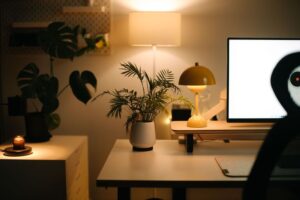
Tips for Creating a Cozy and Productive Home Office Space


Creating a home office that balances comfort and productivity is key to enjoying your work-from-home experience. Whether you’re a freelancer, remote employee, or running your own business, a well-designed home office can help you stay focused and feel relaxed. In this post, we’ll explore practical tips on how to create a cozy and effective workspace tailored to your needs.
Why a Cozy Home Office Matters
Spending a lot of time in your home office means that comfort plays a big role in your overall well-being. A cozy environment can reduce stress, improve your mood, and increase your motivation. When your workspace feels inviting, you’ll look forward to sitting down and getting work done.
At the same time, productivity depends on organization and minimizing distractions. Striking a balance between comfort and efficiency means designing your space with intention.
Choosing the Right Location
Find a Quiet Spot
Pick a room or corner in your home that’s as quiet as possible. Avoid areas with heavy foot traffic or noisy appliances. If space is limited, consider using a room divider or a tall bookshelf to create a visual and sound barrier.
Natural Light Matters
Try to position your desk near a window. Natural light helps regulate your body clock and boosts energy. If natural light isn’t an option, invest in good quality artificial lighting to reduce eye strain.
Selecting Comfortable and Functional Furniture
Invest in a Quality Chair
A supportive office chair is essential. Look for adjustable features such as seat height, backrest angle, and lumbar support. Comfort here helps prevent back pain during long work sessions.
Choose a Desk That Fits Your Needs
Your desk should provide enough surface area for your computer, documents, and any tools you regularly use. Consider adjustable desks that can switch between sitting and standing positions to enhance comfort.
Add Storage Solutions
Clutter can be distracting. Add shelves, drawers, or storage boxes to keep your workspace tidy. Labeling storage containers helps you find items quickly.
Personalizing Your Space
Use Soothing Colors
Colors affect mood. Soft neutrals, pastels, or muted tones create a calm atmosphere. Avoid overly bright or busy patterns that might cause distractions.
Incorporate Plants
Adding greenery brings life to your office and has been shown to reduce stress. Choose easy-care plants like succulents or pothos that thrive indoors with minimal maintenance.
Decorate Thoughtfully
Add a few personal touches such as photos, artwork, or a favorite quote. Keep it minimal to maintain a professional vibe and avoid visual clutter.
Organizing for Efficiency
Keep Cords Under Control
Use cable organizers or clips to manage cords and prevent tangling. This not only looks neater but also reduces hazards.
Utilize Desk Organizers
Tray organizers, pen holders, and file organizers keep your essentials within easy reach. Keeping tools organized saves time and keeps your mind clear.
Plan Your Workflow
Arrange your desk items based on frequency of use. Keep frequently used tools close and stow less-used items away.
Enhancing Productivity
Minimize Distractions
Try to keep your workspace free from non-work-related items or devices that may interrupt your focus, like TVs or gaming consoles.
Set Boundaries
If sharing your space with others, establish clear work hours and communicate your need for uninterrupted time.
Create a Routine
Start your day with a consistent routine. This signals your brain that it’s time to work and helps build focus.
Improving Comfort and Health
Take Breaks
Remember to stand up, stretch, or walk around regularly to avoid stiffness and fatigue.
Pay Attention to Ergonomics
Align your computer screen at eye level and keep your wrists straight while typing. An ergonomic setup can prevent strain and injuries.
Control Room Temperature
Maintain a comfortable temperature to avoid feeling too hot or cold, which can affect concentration.
Technology Tips for a Smooth Workflow
Reliable Internet Connection
Ensure you have a stable internet connection to avoid frustrating interruptions during video calls or downloads.
Noise-Canceling Headphones
If you work in a noisy environment, consider noise-canceling headphones to block distractions and enhance focus.
Backup Your Data
Use cloud storage or external drives to store important files and prevent loss.
Final Thoughts
Creating a home office that is both cozy and productive takes some thought and planning, but the payoff is well worth it. With the right location, furniture, organization, and personal touches, your workspace can become a place you enjoy spending time in. Remember to prioritize comfort alongside efficiency to keep your energy and focus at their best.
With these tips in mind, you’re ready to transform your home office into a welcoming and effective environment. Happy working!